_bg_removed2.png)
01 / INPUT
COMMERCIAL
Quote becomes controlled work
Build cost, prepare the customer quote, then create the project only after approval.
Cost sandbox
Quote designer
Approved project creation
BOM-driven manufacturing operations
MeshWorks turns your assembly into a living bill of materials. Revisions, quotes, purchase orders, receipts and production progress stay on the same row, from the first CAD export to the last part on the shelf.
Animated illustration: a seven-part drive unit is sent from CAD to the MeshWorks bill of materials. Each part becomes a row with its thumbnail, a revision adds two screws, and the rows move through quotation, ordering and receipt until the kit is ready for production.
MeshWorks connects commercial, engineering, purchasing and production without hiding where data entered or who approved the next step.
Build cost, prepare the customer quote, then create the project only after approval.
Use Excel or CSV, or the available SOLIDWORKS pilot. Sign in and open Integrations for the authorized add-in download.
Briefings, classification suggestions and planning support use the active record. A person approves operational changes unless a reviewed rule says otherwise.
From bill of materials to project delivery, every stakeholder works from the same source of truth.
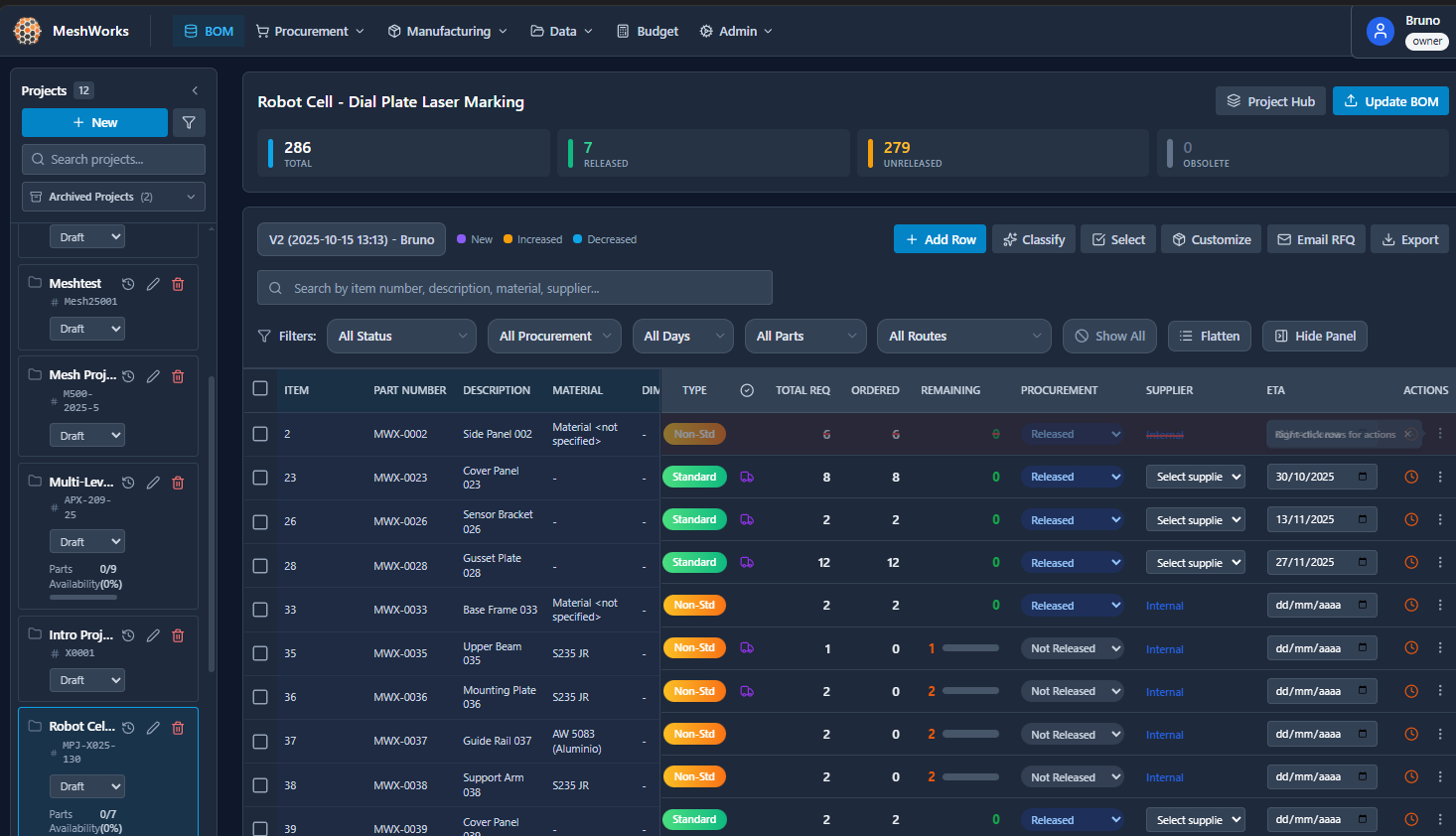
Full project BOM with real-time procurement status, revision tracking, and multi-level structure support.
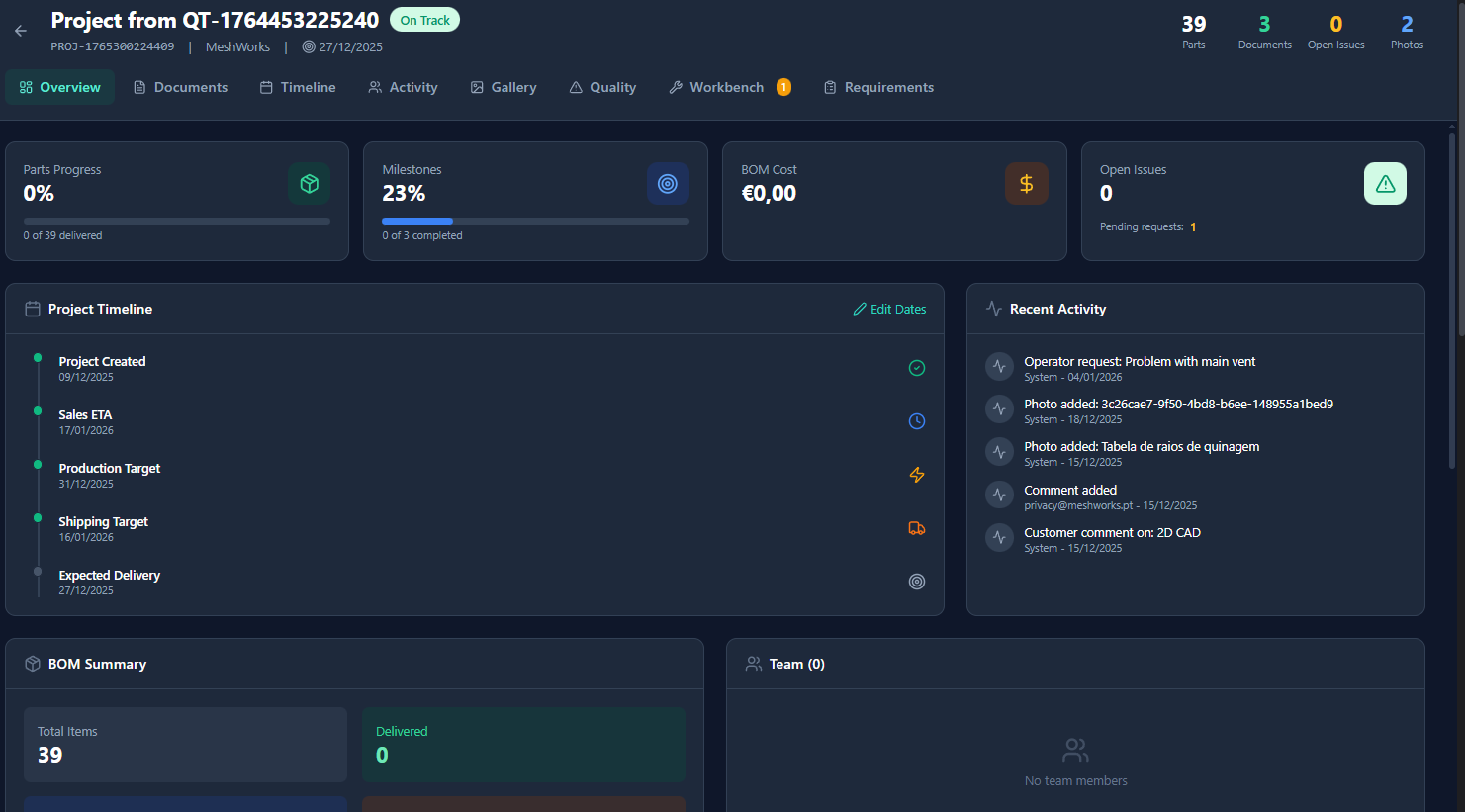
Complete project oversight with progress tracking, milestones, cost summaries, and team activity feed.
SOLIDWORKS is now available as an authorized pilot. Sign in and open Integrations to download it. Neutral file imports remain available.
ERP connectivity is implementation work, not a generic switch. We define the source of truth, interface, permissions and retry behaviour for each data flow.
REST and GraphQL
Scoped application APIs
Webhooks
Event driven handoffs
OData
ERP data services
JSON RPC
Service specific adapters
IDoc and events
Enterprise message flows
Excel and CSV
Controlled file exchange
Read only bridge
Safe discovery phase
Customer adapter
Legacy and proprietary systems
Write enabled flow
Approved after validation
Engineering to purchasing
Review imported BOM iterations, changed quantities and release status before engineering hands revised demand to purchasing.
Explore the workflow →Connect a SOLIDWORKS assembly BOM to project review, release and purchasing in MeshWorks, with an authenticated pilot add-in or spreadsheet import.
Explore the workflow →Review revised engineering demand alongside ordered and remaining quantities before deciding what purchasing should do next.
Explore the workflow →A real look inside MeshWorks — from BOM management to AI-assisted quoting and production tracking.
Follow real work from the first machine concept through quoting, engineering context, purchasing and planning.
BOM, procurement, production, quoting and customer access work from the same operational record.
Import from any CAD export. Columns auto-map to your schema. Revision changes are detected and highlighted across versions.
Define rules once. Standard vs. custom, bought-out vs. fabrication. Every import classifies automatically without manual tagging.
New BOM revision uploaded? See exactly what changed: quantities, additions, removals. Catch issues before they impact procurement.
All drawings in one searchable location. Auto-matched to BOM line items. No duplicate files or broken references.
Release parts in batches. Track orders, quantities, and supplier lead times. See revision impacts on existing orders instantly.
Engineers, purchasers, operators, and managers each see data relevant to their role. Same source of truth, filtered by function.
Visual production boards connected to your BOMs. Drag-and-drop workflow, QR scanning, and real-time operator updates from the shop floor.
Give customers self-service access to project timelines, milestones, and shared documents. Secure PIN-based login with controlled visibility.
Professional quotations with material catalogs, labor rates, machine time calculations, and multi-currency support. Full revision tracking.
Deploy MeshWorks on infrastructure your company controls. Keep BOMs, supplier information, project costs, and engineering files inside your network while your team defines the identity and connection boundary.
The local deployment keeps the operational record close to the team that owns it. We confirm the final infrastructure and identity fit during architecture review.
MeshWorks can be delivered as a containerized deployment for a company-managed Linux server. We agree the final topology, database, backup, and support boundary with your team before go-live.
Connect the local deployment to the identity system your company already runs. SSO, LDAP, or Active Directory and the role mapping are configuration work, so we validate the provider and permission model with you.
Start fully offline or enable only approved services. Email, AI, analytics, and update channels are optional connections that your organisation can review and configure deliberately.
In a customer-managed on-premises deployment, MeshWorks does not receive your BOMs, supplier data, or project files. In the fully offline profile there is no telemetry or background connection. Any optional external service must be configured and enabled by your organisation.
On-premises, hybrid, and cloud are deployment choices. We help map the right profile to your security and operating requirements.
Run the agreed platform footprint locally on your server with no external connection. Suitable for regulated environments when the deployment requirements are met.
Keep the platform on your server and selectively enable approved services such as email, AI assistance, or updates through channels your team controls.
Choose a managed service when speed and convenience matter more than operating the infrastructure yourself. Data residency and service scope are agreed for the selected plan.
The first step toward automated workflows and information management is a BOM process your team can trust. MeshWorks helps you define the structure, ownership, revision rules, and handoffs that make later automation safe and useful.
Talk to us about BOM consultingCompatible with any CAD software, PLM system, or spreadsheet export. No special formatting required.
Export your BOM from SolidWorks, Inventor, Fusion 360, or any CAD system to CSV or Excel.
Drop your file. The system auto-detects Part Number, Description, Quantity, and other columns.
Classification rules tag standard vs custom parts automatically. Release to procurement with one click.
Engineers, purchasers, and managers track progress in real-time. Version control highlights all changes.
Engineering reading
Practical notes on CAD, engineering information and responsible automation.
CAD and BOM
How engineering intent, BOM identity and purchasing work connect after a CAD export.
Read articleEngineering data
Why source data, ownership and approval matter before automating a manufacturing workflow.
Read articlePractical automation
An introduction to bounded AI assistance, operational context and human review in manufacturing.
Read articleStart free for 14 days. No credit card required. Upgrade when you see the value.
Full power for one engineer
per month
Your whole team, one platform
per month
Scale fast, stay in control
per month
Built around your operation
contact us
14 days to explore. No commitment. No credit card.
Real people, real answers. Usually within a few hours.
Reach us directly
We typically respond within one business day.