Engineering leads · Project managers · Purchasing

Review BOM changes before the next purchase or release.

A new engineering export can change quantities, add components and move work between assemblies. Keep that change visible in the project where the team reviews release and purchasing decisions.

The handover to get right

A spreadsheet sent by email gives purchasing a snapshot. It does not, by itself, explain what changed since the previous import or whether the new demand is ready to order. MeshWorks keeps imported BOM iterations in the project so engineering and purchasing can review the same working context.

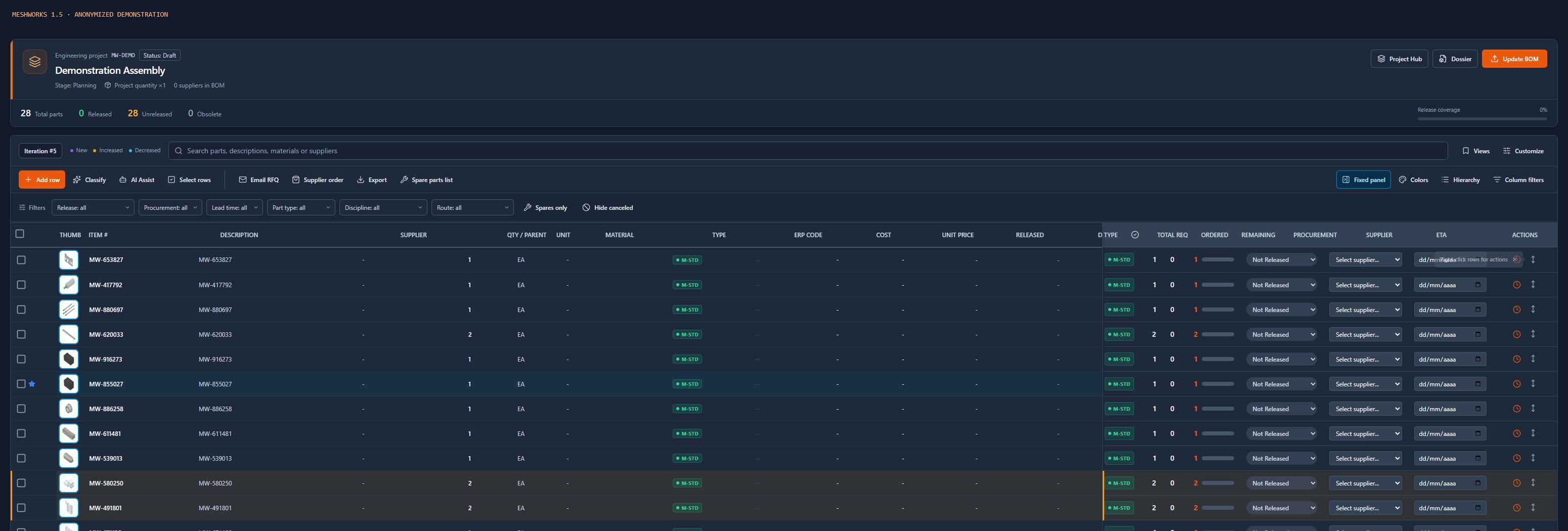
Anonymized demonstration: the BOM workspace brings iteration, part information and project context into one review.

A practical review sequence

01

Import into the intended project

Choose the project and check the source columns and part identities before bringing in the next BOM. Review parent relationships and quantities as well as descriptions; a familiar description alone is not a reliable part identity.

02

Inspect the imported iteration

Use the iteration selector and change cues to identify new parts and increased or decreased quantities. Check the assembly hierarchy and project quantity before interpreting a change as new purchasing demand.

03

Review release and procurement together

Inspect release status alongside purchasing information. A newly imported component or quantity change needs an engineering review; its presence in the BOM is not approval to buy it.

04

Give the next action a shared context

Use the current project BOM when preparing an RFQ or reviewing remaining quantities for a supplier order. Keep project records in the Dossier so the team can find the relevant commercial history.

Questions from the team

Is a BOM iteration the same as a CAD revision?

No. The source CAD revision describes the engineering source. A MeshWorks iteration records an import into the project. Review both contexts when deciding which data is ready for release.

Does importing a revised BOM approve new purchases?

No. Review the changed demand and the applicable release and purchasing permissions before preparing or recording an order.

Can the team review quantities without a CAD add-in?

Yes. Spreadsheet BOM imports support a review workflow without requiring every reviewer to work inside CAD. Check the import mapping and part identities before relying on the result.

Review your actual handover

Bring your workflow questions to a demo.

Walk through the project BOM, release and purchasing steps with the MeshWorks team and check which parts fit your process.

Talk to the team