· MeshWorks
Next generation sheetmetal workflow
STAGE and TRACE bring geometry, nesting and cost estimates into a calculation workflow built for API integration.
From a customer file to a quotation
A customer sends a STEP file and asks for twenty parts. Before a laser cutting company can price the job, someone needs to establish the material requirements, prepare a flat pattern, account for the cutouts and decide how the parts will fit on the available stock. Bending and finishing add their own assumptions to the price.
STAGE and TRACE bring those calculations into a connected workflow. The public STAGE Studio is now available to try, and the calculation services are designed for API integration with customer portals, quotation software and internal production systems.
MeshWorks built the STAGE workflow kernel from scratch, in house. Its design carries information from the source geometry into the calculations that follow, so a flat pattern, its cutting measurements and a cost estimate remain tied to the part being reviewed.
For a fabrication business, this provides the calculation layer behind a faster quotation service. An integration can receive an emailed request or a file dropped onto the company's website, submit the supported geometry for processing and apply the company's pricing rules to the results. Straightforward requests can then proceed automatically; exceptions can be directed to the person responsible for estimating.
What the geometry contributes
STAGE inspects the solids in a STEP file and identifies supported sheet geometry. The selected body can be unfolded using an explicit K factor, with the resulting flat pattern available for inspection and export.
The information used downstream includes thickness, physical bends, the outer contour and internal cutouts. Cutting length, pierce count, flat area and mass give a costing system quantities it can use directly. Material price and machine rates remain company inputs.
To prepare this article, we ran Part11_BSA_X through the published Studio. The result identified seven physical bends and fourteen cutouts, and produced a flat pattern measuring 237.23 by 157.40 mm. Its total cutting length was approximately 1.416 metres. The complete inspection and unfolding request took about 46 seconds on the public test server in this run.
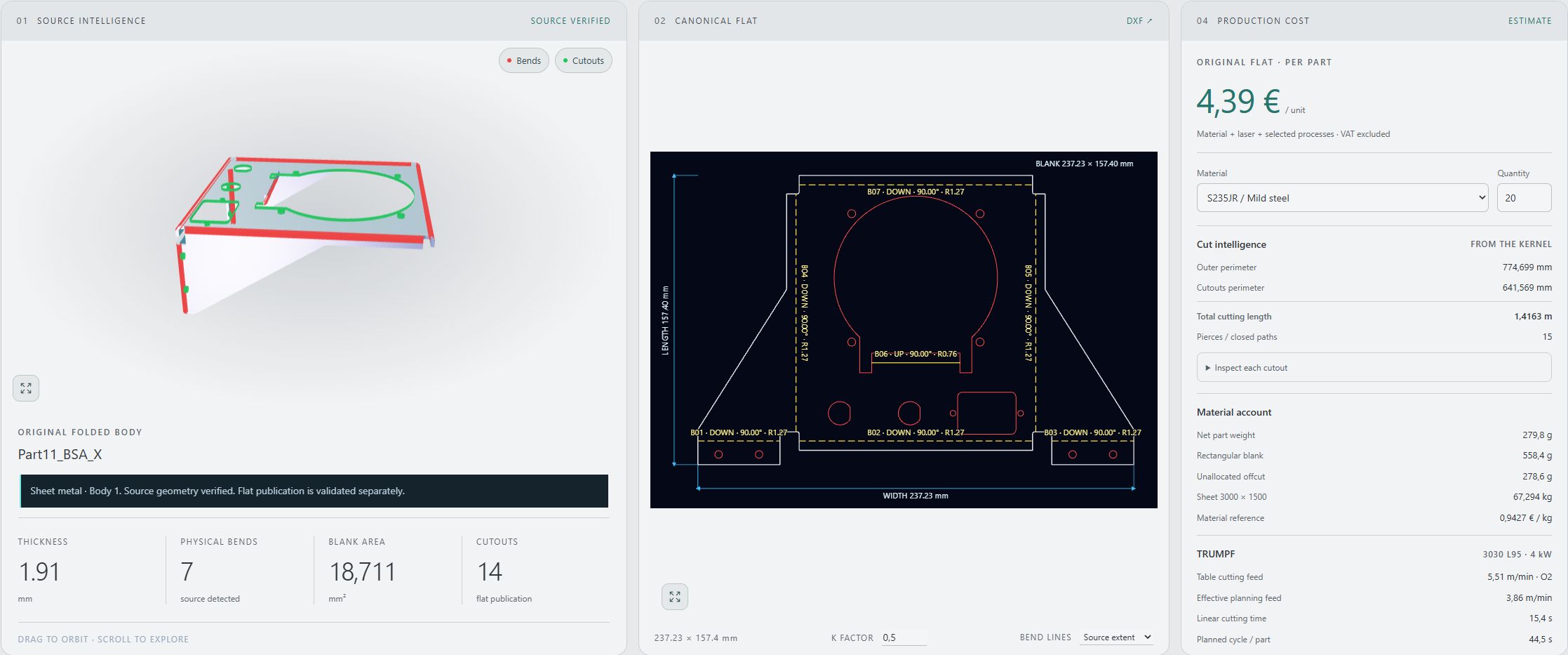
Actual application capture using Part11_BSA_X. The displayed costs use the selected material and editable operating assumptions. The single part cost panel uses its own material allocation; the nesting job below accounts for purchased sheets.
The sheet belongs in the cost calculation
Nesting changes the material required for a batch. A useful quotation therefore needs to consider the available sheet sizes and the quantity ordered, alongside spacing, edge margins and permitted rotations.
TRACE takes the flat geometry into a nesting job. In the demonstration shown here, we requested twenty identical parts with 3 mm spacing and a 5 mm edge margin. A run using 1000 by 750 mm stock required two sheets. Changing the available stock to 1000 by 1000 mm allowed the same twenty parts to fit on one sheet.
With the same selected cutting and bending assumptions, the displayed job estimate changed from EUR 98.41 to EUR 91.36. These are results from this demonstration, not a general savings claim. The difference comes from the full sheets purchased in each case; unused material was not assigned a remnant credit.
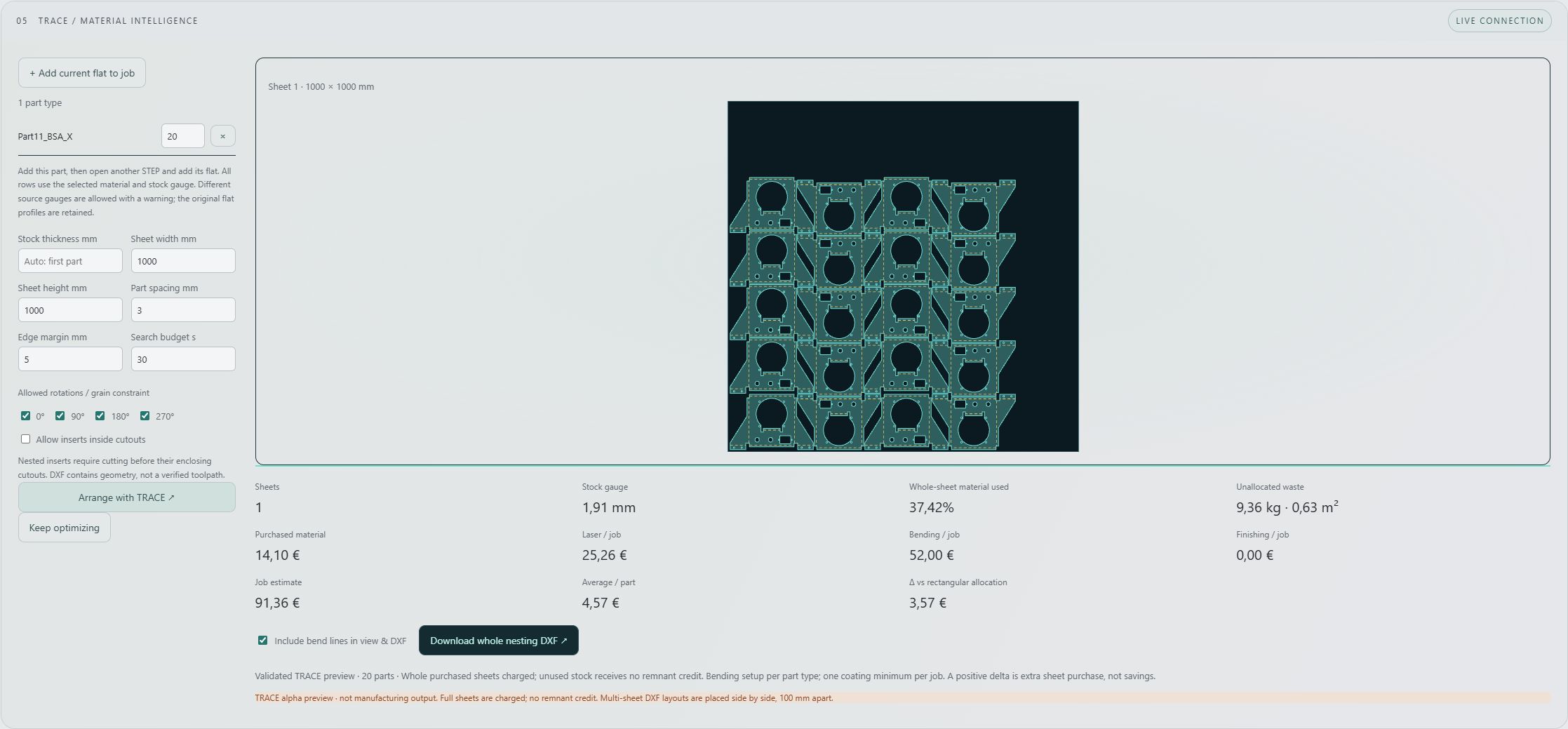
Actual TRACE preview for twenty parts. The displayed job estimate includes material, cutting and bending under the selected assumptions, with VAT excluded. It is a cost estimate rather than an offer to manufacture these parts.
This relationship between geometry, stock and cost is useful beyond laser cutting. Sheet fabrication businesses, subcontract manufacturers and companies preparing internal estimates can use the same calculations within the process they already operate.
Configure the process for the workshop
An automatic quotation needs the workshop's rules. Material rates, available stock, machine capability, setup allowances and commercial margins must reflect how the company works. A customer upload can supply the geometry and quantity; the integration supplies the relevant process configuration.
Tooling introduces another set of decisions. A preferred bend radius should come from an approved tooling policy, with clear rules about which dimensions must be preserved if geometry is changed. The kernel architecture includes controlled radius and gauge variation for supported geometry, separate from the original flat pattern. That work needs validation against the intended manufacturing process.
This is also where an agent can be useful during implementation: helping translate an agreed process into explicit configuration and coordinating API requests. The geometry services and application rules remain responsible for checking the requests and their results.
Email intake, a website upload form and tooling policies are integration work around the kernel. MeshWorks can help define those connections, configure the workflow and establish which requests are suitable for automatic processing. Once that scope is in place, a quotation can be returned as soon as the required calculations and commercial checks complete.
Try the published Studio
The public Studio provides STAGE RC2 inspection, unfolding and cost estimation, with TRACE available as a nesting preview. TRACE is currently labelled an alpha preview, and its DXF layouts are not validated machine toolpaths. The controlled radius and gauge experiment is not exposed in the public Studio, and the demonstration does not automatically validate tooling or bend sequences.
The screenshots above are real application results. The cover is an editorial illustration. Processing time and cost depend on the supplied geometry, selected settings and server load.
Open STAGE Studio to try a supported STEP file. For API access or a quotation workflow built around your own website, email intake and workshop rules, talk to MeshWorks.